Runbooks
A runbook in a wiki drifts from what people actually type. As an mdsh document, the commands are the runbook: the prose says why, the blocks do it, and the output under each block shows what happened this time.
- Stop when something is wrong.
on_error: stopin the front matter ends the run at the first failing step, so a deploy never ships a build that failed its checks. - Ask before the risky step. A block marked
confirm="Ship to production?"shows its code and waits for a yes. CI passes--yes; a person at a terminal answers each one, or steps through every block with--step. - Don’t hang.
timeout=30skills a stuck block. - Do two things at once. A
backgroundblock starts and the run moves on; a later blockwaits for it and gets its exit status. - Keep the record.
mdsh -wwrites the output into the file, so the runbook in git shows the last run.--pdfor--htmlturns the run into a report to attach to a ticket or a change request.
Sample: deploy a site
deploy.md
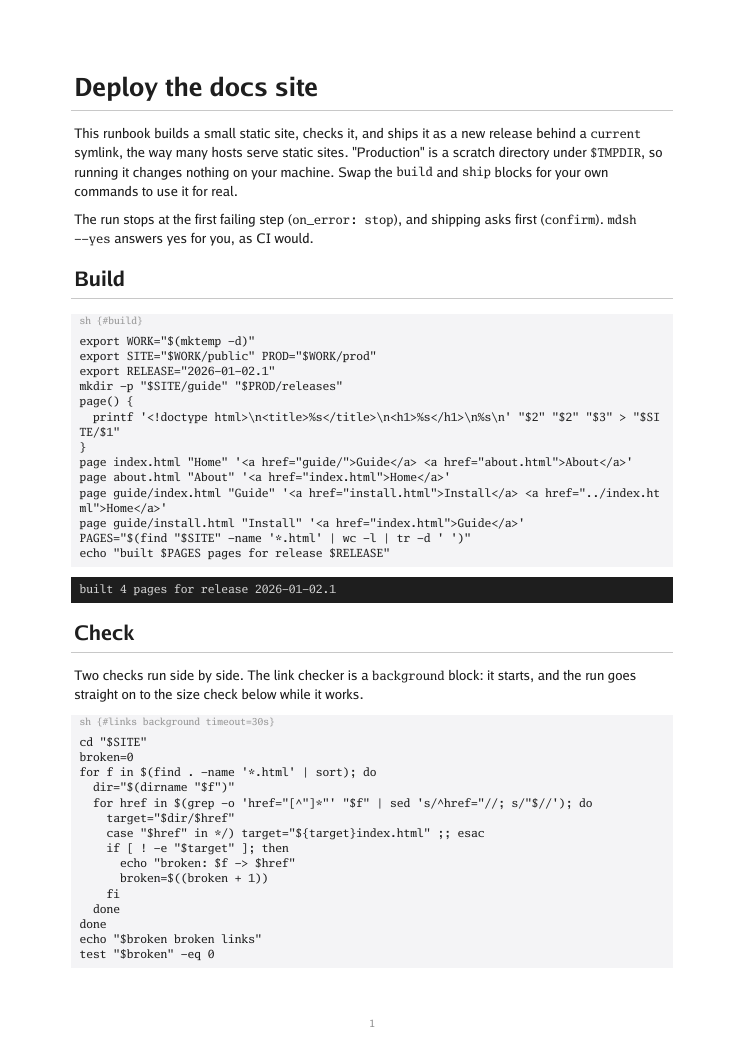
builds a small static site, checks its links in the background while it
checks its size, asks before shipping, switches a current symlink to the
new release, and checks production matches the build. “Production” is a
scratch directory, so it is safe to run anywhere.
mdsh deploy.md                        # run it, asking before Ship
mdsh --yes --pdf deploy.pdf deploy.md # unattended, as in CI, with a PDF
The report from one run: PDF · HTML · markdown
More runbooks
- release-checklist.md tags a release in a scratch git repository, with numbered steps whose blocks sit inside the list, and cleans up only if every step worked.
- mdsh-release.md
is how mdsh itself is released: it checks the changelog and the
checkout, and with
PUSH=1tags and pushes the release. - linux-triage_linux.md
and
macos-triage_darwin.md
are the first read-only steps when a host is slow: load, memory, the
busiest processes, full disks.
on_error: continuekeeps going past a step that fails, since partial answers still help in an incident.